Is there an official Build and Conquer road layout?
No published official blueprint. This page is Community layout advice for Place 103767961452227.

Build and Conquer city layout: ring first, housing by farms, power off dense homes, factory spur, reserved tunnel pads. Community, not a listing blueprint.
Housing on the road, farms beside suburbs, industrial kept off the city on Place 103767961452227.
~9 min read
Build and Conquer city layout on Roblox Place 103767961452227 by The Slop Company is community principle, not an official blueprint. The listing names the kinds — neighbourhoods, roads, farms, shops, factories, power plants, water networks — then research, military, and tunnels. It does not publish a grid. Verified October 12, 2026 on Build and Conquer [V0.1]. Play on Roblox.
| Fact | Detail |
|---|---|
| Platform | Roblox · Desktop, Console, Mobile, Tablet |
| Genre | Strategy · city builder + military contest |
| Place | 103767961452227 |
| Developer | The Slop Company |
| Official kinds | Roads, neighbourhoods, farms, shops, factories, power plants, water networks |
| Layout source | Community templates — not a listing blueprint |
| Industry buffer | Community — keep factories off dense housing |
| Power siting | Community — park plants off the densest neighbourhoods |
| Numbers | Tile costs / pop per pad TBA — do not treat recap HUD as rates |
| Lookalikes | Not Command & Conquer base maps, not iOS Build & Conquer cities |
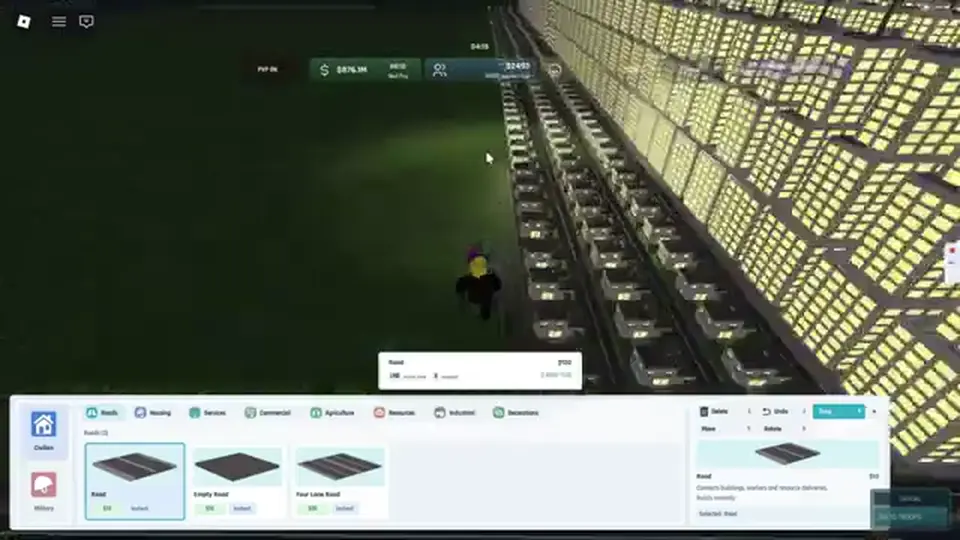
Roads are the listing’s first neighbourhood tool. Build and Conquer city layout that starts as scattered housing on dirt does not feed population, jobs, or cash. Lay a spine you can grow, then stubs for farms and shops. Do not fill the plot and hope a road appears later.
| Piece | Job | Beginner rule |
|---|---|---|
| Spine / ring | Connect every later footprint | One complete loop before infill |
| Stubs | Reach farms, shops, later factories | Short branches, not dead-end islands |
| Housing on the net | Population and workers | On the road, next to food |
| Drag-place housing (HUD) | Fast infill once the spine exists | Community — roads first, then drag along the curb |
Community recaps place roads, then enable drag and paint housing along the curb. That only works if the road already exists. A Build and Conquer road layout that skips the spine leaves you with unconnected pads that never join the city meters.
Do not wait for a mainland occupation to “fix” access. Occupying a mainland city is a later PvP step in community recaps. Early layout stays on the home plot: one ring, then stubs.
Once the ring exists, housing and farms share the inner curb — factories do not. That buffer is the next section.
The listing pairs neighbourhoods with farms and shops. It does not tell you to park factories against mid-rise housing. Community city layouts keep an industry buffer: homes and food together, production on a spur. Treat that as Community, not a listing blueprint.
| Zone | Sits next to | Does not sit next to |
|---|---|---|
| Housing / neighbourhoods | Farms, shops, the road ring | Factory pads, plant stacks |
| Farms | Housing (food for population) | Isolated dirt with no road |
| Shops | The ring, facing residents | Empty industrial stubs |
| Factories | A dedicated spur with power/water | Dense mid-rise blocks |
A starter recap keeps the industrial place away from the city for a cleaner grid and, they say, happiness. Exact happiness penalties stay TBA. Use the habit: if you cannot name a buffer strip between homes and factories, you do not have a layout yet — you have a pile.

Housing density is also Community. Mid-rise apartment pads are described as narrow, so more people fit on one stub than sprawling suburbs. Recap HUD reads around 32 population when a mid-rise finishes and about 48 after upgrade — both Community / Unverified, not official rates. Packing hint only.
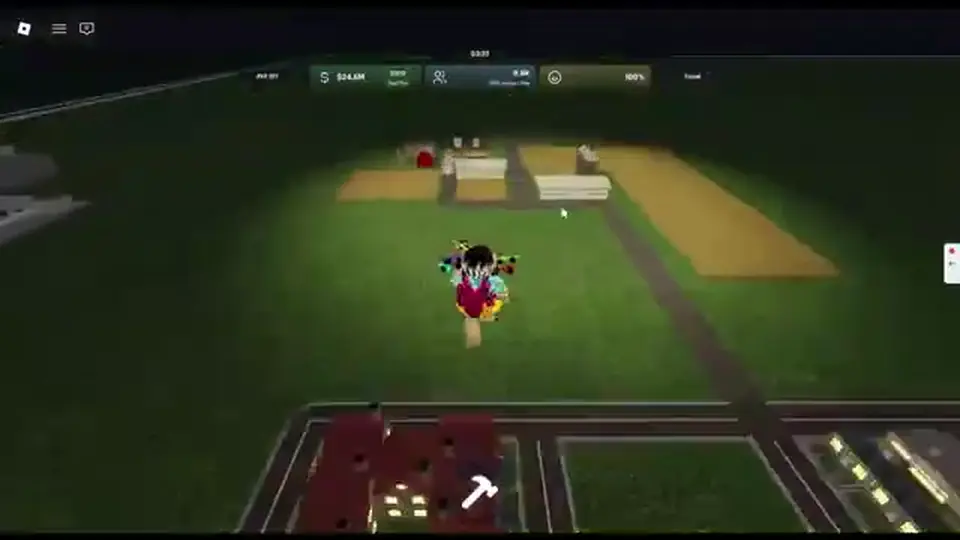
Farms belong in the same session as the first neighbourhood. Shops harvest that neighbourhood. Catalog names live on buildings; this page only places them.
Utilities still have to sit somewhere. Power plants and water networks go on the edge, not in the densest block.
The listing asks you to manage power and water with money, workers, population, resources, happiness, research, and production. Capacity has to exist before factories run. Community siting: park plants off the densest neighbourhoods so a blackout and a happiness crash do not hit the same tiles.
| Utility | Community siting | Do not |
|---|---|---|
| Power plants | Edge of the plot, off dense housing | Stack against mid-rise rows |
| Water networks | Scale with population and industry | Add apartments on a dry stub |
| Factories | Spur that already has power and water | Drop on day-one housing dirt |
| Shops | On the ring, not on the plant pad | Use plants as a cash district |
Add plants and water as neighbourhoods and factories come online, not after happiness has already tanked. Exact draw and output stay TBA — this page does not invent production rates.
If the HUD shows Nuclear or another high-output label the listing never used, treat the name as Unverified. The listing kind is still “power plants.” Place the kind; do not plan the city around a fan-wiki silo.
Meter repair when the grid fails lives on economy. Layout’s job is to leave room so that repair is possible.
Early vs mid templates are just those rules applied twice — ring first, spur later.
There is no official Build and Conquer city layout screenshot. These two templates are Community packing order so you do not paint yourself into a corner. Copy the sequence, not a pixel map.
| Stage | On the plot | Still empty |
|---|---|---|
| Early | Connected ring, mixed housing/farms, one shop cluster, enough power and water that happiness holds | Factory spur, research pad, military/tunnel strip |
| Mid | Factories on a spur, research nearby, utilities scaled, shops still on the ring | Mainland contest — tunnels later |
| Do not skip to | Missile pads as the first district | Home-plot shops and food |
Finish the loop before every tile is housing. Leave one inner stub for farms and one outer stub for a future factory. If cash dries mid-build, finish food and shops on the ring before another block. Construction takes time — a placed footprint can sit unfinished while you pan.
Community HUD recaps also mention a glass-tower apartment row with a large footprint. Treat size and HUD meters as Community / Unverified. Early layout prefers the ring you can walk, not the biggest pad you can afford.
When shops and the grid hold for a full construction cycle, grow the factory spur away from housing. Park research near that spur so you are not walking unlocks across the whole city. Military and tunnels still wait on the mainland-facing edge you left empty.
That reserve is easy to forget once the plot looks “full.” The next section is when to stop infill and leave the strip.
Matched by build plan, shared topics, and guide progression — not random related links.
Official copy: deploy troops through tunnels to the mainland, defend cities, fight for strategic areas. Those buildings still need a connected pad. If the early ring ate every edge tile, you will delete housing later or stack guns against homes — both are layout failures.
| Pad | Faces | When it is safe to fill |
|---|---|---|
| Military buildings | Mainland-facing edge, not the housing ring | After shops and the grid hold — community recaps also cite a city-level gate (Unverified) |
| Tunnels | Same edge, road already connected | After the home city can feed workers; not a first-hour cash cheat |
| Research | Near the factory spur | When cash and power survive a construction cycle |
| Defense HUD names (Iron Dome / Arrow / C-RAM) | Community air-defense labels | Unverified — military page, not this grid |
Scan this before you paint another district. Each row is a Build and Conquer road layout failure mapped to a fix, so you do not reread the whole page.
| Mistake | Fix |
|---|---|
| Joined the wrong Roblox experience | Confirm Place 103767961452227 and Build and Conquer [V0.1] |
| Housing before any road | Spine or ring first, then footprints on the net |
| Homes inside the factory block | Community buffer: housing + farms on the ring, factories on a spur |
| Power plants against dense mid-rise | Community siting: plants on the edge, off the densest homes |
| Shops on empty industrial dirt | Face shops at residents on the ring |
| Farms with no road | Stub from the ring before the farm pad |
| Filling every edge tile early | Leave a mainland-facing strip for tunnels and military |
| Treating a friend’s screenshot as official | Community template only — listing has no blueprint |
| Copying Command & Conquer or iOS city maps | Wrong game — listing kinds only |
| Draining cash into missiles on a cramped plot | Finish the ring, food, shops, and grid first |
Before you place anything, name the zone: ring (access), inner curb (people + food + shops), edge (power + water), spur (factories + research), reserved strip (military + tunnels). If you cannot name the zone, do not place the building.
When that map is automatic, keep the meters alive on economy instead of adding another pretty block.
Next: keep money, workers, food, power, water, and happiness alive — economy.
Building kinds: buildings. First hour: beginner guide.
No published official blueprint. This page is Community layout advice for Place 103767961452227.
A connected road ring, then housing next to farms, then shops on the ring. Power plants and water networks sit on the edge as demand rises.
Community habit says no: keep an industry buffer and put factories on a spur. The listing does not publish a grid; happiness penalties stay TBA.
Community siting parks plants off the densest neighbourhoods. The listing kind is power plants; Nuclear and similar HUD names stay Unverified.
Yes if you want mainland deployment later. Reserve a mainland-facing, road-connected strip. Tunnels are not first-hour cash.
No. Recap HUD reads (for example mid-rise ~32 / upgraded ~48) are Community / Unverified. This wiki does not treat them as production rates.
No. This layout is Roblox Place 103767961452227 by The Slop Company only.
October 12, 2026
Matched by build plan, shared topics, and guide progression — not random related links.